
You download a new wallet, set it up, and then realise it doesn’t support Ethereum, BNB, Solana — or anything that isn’t Bitcoin. That’s the BlueWallet experience, and for a certain type of user, that’s actually the point.
BlueWallet has been around since 2017. It’s open-source, non-custodial, and built specifically for people who consider Bitcoin to be the only cryptocurrency that matters. The Lightning Network integration, multi-sig vault, and plausible deniability features make it genuinely interesting — but it’s worth being upfront about what it can’t do before you commit.
This review covers everything from security architecture to the Lightning custody quirk that surprises a lot of users.
How We Rate BlueWallet
Before the verdict, here’s how the scoring works. All five categories use a /10 scale with different weightings based on what matters most for a wallet review.
| Category | Score | Weight | What It Measures |
|---|---|---|---|
| Security | 8.5/10 | 30% | Encryption, key storage, 2FA, incident history, open source status |
| Asset Support | 3.0/10 | 20% | Chains, tokens, custom token import, multi-chain breadth |
| DeFi Features | 1.0/10 | 20% | Swaps, staking, DApp browser, NFTs, bridge |
| UX & Mobile | 7.5/10 | 15% | App quality, onboarding, navigation, accessibility |
| Support | 5.0/10 | 15% | Channels, response time, docs, community |
Overall Trust Score: 5.2/10
The low overall score isn’t a verdict on BlueWallet’s quality — it reflects the scoring penalties for being Bitcoin-only in a framework built for multi-chain wallets. For Bitcoin storage specifically, it performs far better than that number suggests.
BlueWallet Review: Quick Verdict
Trust Score: 5.2/10
BlueWallet is a solid, open-source Bitcoin wallet built for privacy-conscious users who want full control over their keys. It handles on-chain Bitcoin and Lightning Network payments well, includes genuine advanced features like multi-sig and PSBT hardware wallet support, but offers nothing beyond Bitcoin — no altcoins, no NFTs, no DeFi. Best for Bitcoin maximalists and privacy-focused holders; not suited to anyone who wants a multi-chain wallet.
Pros:
- Non-custodial on-chain wallet — private keys stay on your device
- Open-source MIT license with active development (3.2k GitHub stars, v8.0.0 as of June 2026)
- Multi-sig vault, PSBT hardware wallet support, plausible deniability mode
- Lightning Network integration for fast, low-cost payments
Cons:
- Bitcoin-only — no Ethereum, altcoins, tokens, NFTs, or DeFi
- No two-factor authentication
- Lightning wallet is custodial by default (LNDHub) unless you self-host
Key Takeaways
- BlueWallet is a non-custodial, Bitcoin-only mobile wallet — your private keys never leave your device on the on-chain wallet
- The Lightning wallet is custodial by default (powered by LNDHub), which is worth understanding before you fund it
- Multi-sig support requires multiple private keys to authorise a transaction — one of the more practical security setups available in a free mobile wallet
- Hardware wallet integration works via PSBT (Partially Signed Bitcoin Transactions) — compatible with Ledger, Trezor, Coldcard, and Cobo Vault
- There is no two-factor authentication; security relies on device password and biometrics
- BlueWallet has 1M+ downloads on Google Play and is rated 4.0/5 on the App Store (838 ratings, as of June 2026)
- No KYC required — no identity verification of any kind
BlueWallet Quick Facts
| Detail | Value |
|---|---|
| Name | BlueWallet |
| Headquarters | United Kingdom (BlueWallet Services S.R.L.) |
| Year Founded | 2017 |
| Storage Type | Hot wallet (software) |
| Custody | Non-custodial (on-chain); Custodial by default (Lightning via LNDHub) |
| Supported Cryptocurrencies | Bitcoin only (BTC, Lightning BTC) |
| Supported Blockchains | Bitcoin mainnet, Lightning Network |
| Devices | iOS 15.6+, Android, macOS 12.5+, Desktop |
| Open Source | Yes — MIT licence |
| KYC Required | No |
| Native Token | None |
| App Store Rating | iOS: 4.0/5 (838 ratings) / Android: 3.8/5 (5.02K reviews) |
| Trustpilot Rating | Not listed |
What Is BlueWallet?
BlueWallet is a free, open-source Bitcoin and Lightning Network wallet for iOS and Android. Founded in 2017 by Igor Kosakov, Nuno Coelho, and Marcos Rodriguez — three developers who couldn’t find a Bitcoin wallet that did everything they wanted — it’s grown to 1M+ Android downloads and received its v8.0.0 update in June 2026.
The core philosophy is self-custody. On the on-chain side, your private keys never touch BlueWallet’s servers — you hold them, you control them, end of story. The Lightning side gets more nuanced (we’ll cover the custody model in the security section), but the on-chain wallet is as pure a self-custody experience as you’ll find on mobile.
Target audience here is pretty clear: Bitcoin holders who take security seriously, want Lightning functionality for smaller payments, and aren’t interested in altcoins or DeFi. The advanced features — multi-sig vault, custom UTXO management, watch-only wallets — cater to users who know what those words mean. Beginners can still use BlueWallet without touching any of it, but the interface doesn’t hold your hand as much as, say, Coinbase Wallet.
One notable milestone: in 2021, BlueWallet briefly integrated a custodial Lightning wallet service hosted by the BlueWallet team, then sunset it in 2022, effectively pushing users toward either self-hosting or third-party LNDHub providers. The shift reflected the team’s preference for decentralisation over convenience — which tells you something about the project’s values.
Is BlueWallet Safe?
BlueWallet’s security is genuinely strong for a hot wallet. The honest caveat is that “strong for a hot wallet” still means it’s connected to the internet — which hardware wallets aren’t.
Security Architecture
The on-chain wallet stores encrypted private keys on your device. BlueWallet uses:
- Full device encryption — keys are encrypted with your password, not just locked behind it
- Biometric authentication — Face ID and fingerprint unlock are supported
- No server-side key storage — private keys are never transmitted to BlueWallet servers (confirmed via open-source code review on GitHub)
- SegWit-first support — Bech32 native SegWit addresses by default, reducing fees and improving compatibility
The notable absence is two-factor authentication. BlueWallet doesn’t support TOTP or hardware security keys. For a mobile wallet with serious funds, that’s worth flagging.
Seed Phrase & Recovery
BlueWallet generates a 12-word (on-chain) or 24-word mnemonic seed phrase during setup. The recovery process:
- Write it down — paper or metal, never digital
- Verify the backup before funding the wallet
- Import to any compatible wallet (Electrum, Sparrow, etc.) using the seed
If you lose your phone, your seed phrase is the only recovery option. There’s no cloud backup, no email recovery, no “forgot my wallet” button. This is intentional — and it’s how self-custody is supposed to work. Keep the seed phrase safe, and you’re fine. Lose it, and no one can help you recover your funds. Not BlueWallet, not anyone.
Hardware Wallet Integration
BlueWallet supports PSBT (Partially Signed Bitcoin Transactions), which allows it to work with hardware wallets as signing devices. Tested compatible hardware wallets include:
- Ledger Nano (S Plus, X, Stax, Flex)
- Trezor (Model T, Safe 3, Safe 5)
- Coldcard
- Cobo Vault
The workflow: BlueWallet handles transaction construction and broadcasting, while the hardware wallet handles signing. The private key stays on the hardware device. For large Bitcoin holdings, this is probably the most practical setup — BlueWallet’s mobile convenience without the hot wallet key storage risk.
Privacy Practices
BlueWallet collects only diagnostic and crash data, which is not linked to any identity (confirmed in the App Store privacy label, as of June 2026). No KYC, no email required. You can connect BlueWallet to your own Bitcoin node rather than using their default Electrum servers, which removes the need to trust BlueWallet’s infrastructure entirely.
The “Plausible Deniability” feature lets you create a decoy wallet with a separate password. If someone forces access, you can present the decoy without revealing your real holdings.
Known Vulnerabilities & Incident History
BlueWallet has no publicly documented security breaches as of June 2026. The codebase is auditable (MIT licence, active GitHub repository with 13,615 commits), and the project runs a community bug disclosure process via email.
The Lightning-related custody incident from 2021-2022 — when BlueWallet hosted a Lightning service that was then shut down — was not a security breach. It was a product decision that required users to migrate funds. The team gave advance notice before the shutdown.

Supported Cryptocurrencies & Networks
BlueWallet supports Bitcoin only. No Ethereum, no BNB, no Solana, no stablecoins, no ERC-20 tokens.
The supported network tiers are:
- Bitcoin mainnet — standard on-chain transactions
- Lightning Network — second-layer payment protocol for fast, cheap transfers
There’s no custom token import, no EVM compatibility, no multi-chain portfolio view. If you hold any other cryptocurrency, you’ll need a separate wallet.
The Lightning Network side operates through LNDHub, an open-source Lightning accounting system. BlueWallet’s implementation gives you a Lightning address and lets you send/receive near-instantly at very low fees. The default setup uses BlueWallet’s hosted LNDHub (custodial), but you can point it to your own LNDHub instance for full self-custody Lightning.
Swaps & Bridge
Swaps: Not available. BlueWallet does not include a built-in swap feature. There’s no native exchange, no aggregator integration, and no DEX connection.
Cross-chain bridging: Not available. BlueWallet is Bitcoin-only — cross-chain bridging between Bitcoin and EVM chains isn’t supported. Users who want to swap BTC to ETH or other assets must use an external exchange or bridge service.
Staking
Staking: Not available. BlueWallet does not offer built-in staking. Bitcoin doesn’t use proof-of-stake consensus, so there’s no native staking mechanism. Users who want yield on Bitcoin can explore wrapped BTC (WBTC) staking on external platforms via a separate wallet.
NFT Support
NFT Support: Not available. BlueWallet does not display or manage NFTs. Bitcoin NFTs (Ordinals) are not supported in the standard interface. BlueWallet focuses exclusively on BTC payments and storage.
DApp Browser & Web3
DApp Browser: Not available. BlueWallet does not include an in-app DApp browser and doesn’t support WalletConnect. There’s no connection to DeFi protocols, DEXs, or Web3 applications. For DeFi access, you’ll need a separate EVM wallet (MetaMask, Trust Wallet, etc.).
BlueWallet Features & Services
Despite the stripped-down scope, there’s genuine depth in what BlueWallet does offer within Bitcoin.
Core Wallet Functionality
Multiple wallet types in one app. You can hold:
- On-chain Bitcoin wallet — standard non-custodial BTC storage
- Watch-only wallet — monitor a cold storage address without importing the private key (useful for hardware wallet balances)
- Lightning wallet — fast payments via LNDHub (custodial by default)
- Multi-sig vault — requires M-of-N keys to authorise spending
The multi-sig vault is worth a separate note. You configure the total number of signers and the threshold — a 2-of-3 setup means any two of three keys can authorise a transaction. This is practical protection against single-device loss or theft. Most hot wallets don’t offer this.
UTXO management (Coin Control) lets you select exactly which transaction outputs you’re spending. Relevant for privacy-conscious Bitcoin users who want to avoid combining UTXOs from different sources.
Replace-By-Fee (RBF) allows you to increase the fee on a stuck transaction. If you sent during a congested period and the transaction is sitting in the mempool, RBF rescues it without waiting hours for confirmation.
Fiat On/Off Ramps
BlueWallet integrates with MoonPay for fiat-to-BTC purchases directly inside the app. MoonPay charges its own fees and spreads on top of market rates — typically 3-4% for card purchases (as of mid-2026). The purchase experience is smoother than switching to an exchange, but you’re paying for that convenience.
Hodl Hodl peer-to-peer trading is also integrated. Hodl Hodl is a non-KYC P2P Bitcoin marketplace — useful for users who want to buy or sell without identity verification, at the cost of needing to find a willing counterparty.
There’s no native fiat on-ramp built by BlueWallet itself — all fiat functionality goes through third-party providers.
Notifications & Alerts
Transaction confirmation notifications are available on both iOS and Android. There are no price alerts or security alerts for new device logins built into the app.
BlueWallet Fees
| Fee Type | Amount |
|---|---|
| Wallet Download | Free |
| BlueWallet Platform Fee | None |
| Bitcoin Network (Miner) Fees | Variable — user-adjustable |
| Lightning Routing Fees | Variable — set by LNDHub provider |
| MoonPay Fiat Purchases | Provider fees + spread (approx. 3-4%) |
| Hodl Hodl | Marketplace escrow fee (varies by offer) |
BlueWallet itself charges nothing for sending or receiving Bitcoin. The miner fees you pay go directly to Bitcoin miners — not to BlueWallet. You can choose between Fast (~10 minutes), Medium (~3 hours), and Slow (~1 day) fee tiers, or set a custom fee in sat/vByte.
One thing to be clear about: the wallet doesn’t add a markup to gas estimates. What you set is what gets broadcast.
Compatibility & Accessibility
Mobile App
| Platform | Availability |
|---|---|
| iOS | App Store — requires iOS 15.6 or later |
| Android | Google Play — 1M+ downloads |
Desktop & Browser Extension
BlueWallet has a macOS desktop app (requires macOS 12.5 or later, available via the App Store). There’s also a desktop build available on GitHub for those who prefer manual installation.
There’s no browser extension and no web interface. BlueWallet is mobile and desktop-native — not browser-based.
Regional Availability
BlueWallet imposes no geographic restrictions. The wallet itself is available globally. MoonPay coverage varies by country, and Hodl Hodl availability depends on finding counterparties in your region.
Supported interface languages: 14, including English, French, Spanish, Portuguese, Russian, Ukrainian, German, Chinese, Japanese, and others (via community translations on Transifex).
Reputation & User Reviews
App Store Ratings
- iOS App Store: 4.0/5 (838 ratings, as of June 2026)
- Google Play: 3.8/5 (5.02K reviews, 1M+ downloads, updated June 2, 2026)
The Android rating is more informative given the volume. 3.8 with 5,000+ reviews points to a wallet people generally find functional, with some friction points.
Common Complaints
Recurring themes from user reviews:
- Lightning setup confusion — users don’t always realise the Lightning wallet is custodial by default, which creates anxiety when they can’t find “their keys”
- No altcoin support — a surprising number of reviews complain about Bitcoin-only, suggesting some users download BlueWallet without checking first
- Advanced features without enough documentation — UTXO management, multi-sig vault, and PSBT workflows are all there but not obviously explained for newcomers
The team responds to some reviews on the App Store and maintains an active GitHub, which suggests at least some responsiveness to feedback.
Customer Support
| Channel | Availability |
|---|---|
| [email protected] | |
| GitHub Issues | Active (364 open issues) |
| Telegram | Community access (invite via email) |
| Live Chat | Not available |
| Phone | Not available |
Support is limited. Email-only for direct help, community-driven for everything else. The GitHub repository is legitimately active (13,615 commits, regular releases), so the team is reachable — just not through a traditional support infrastructure.
The help documentation at bluewallet.io covers the basics: wallet creation, Lightning setup, seed phrase backup, hardware wallet pairing. It’s functional but sparse on advanced configurations.
BlueWallet vs Alternatives
| Wallet | Best For | Chains | Swap | Staking | Security Model | Trust Score |
|---|---|---|---|---|---|---|
| BlueWallet | Bitcoin self-custody + Lightning | Bitcoin + Lightning | No | No | Non-custodial / PSBT hardware support | 5.2/10 |
| Electrum | Advanced Bitcoin users, desktop-first | Bitcoin only | No | No | Non-custodial, hardware wallet support | Unreviewed |
| Exodus | Multi-chain portfolio management | 260+ assets | Yes (built-in) | Yes | Non-custodial, no hardware wallet | Unreviewed |
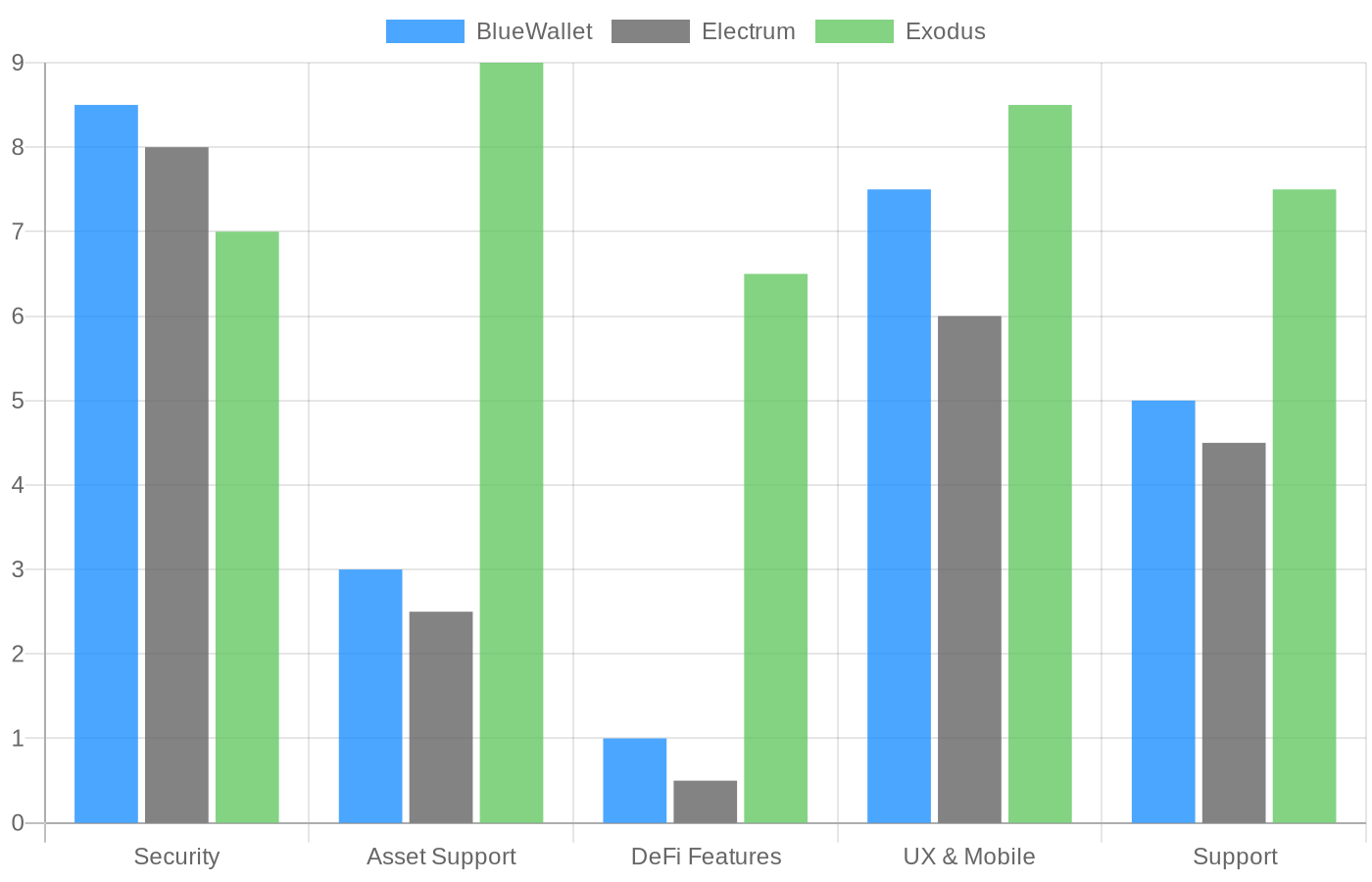
BlueWallet and Electrum are the two main options if you want a serious Bitcoin-only wallet on mobile. Electrum is older, battle-tested, and arguably more feature-complete on desktop, but its mobile experience is rougher. BlueWallet wins on mobile UX and Lightning integration. Exodus is a completely different product — if you hold any altcoins, Exodus is the more relevant comparison.
How to Use BlueWallet: Step-by-Step Guide
1. Download and install
Available on the App Store and Google Play. Also available for macOS via the Mac App Store. Direct APK download from the GitHub releases page if you prefer not to use Google Play.
2. Create a new wallet
Tap “Add Wallet” → choose wallet type. For standard Bitcoin storage, select “Bitcoin.” For fast payments, “Lightning.” For multi-signature, “Multi-sig vault.”
The on-chain wallet generates a 12-word seed phrase. Write it down on paper. Do not screenshot it. Do not store it in a notes app or cloud service.
3. Verify your backup
BlueWallet will ask you to confirm the seed phrase before the wallet is fully active. This isn’t optional admin — if you skip it and lose your phone, your Bitcoin is gone. Take the two minutes.
4. Enable biometric lock
Settings → Security → enable Face ID or fingerprint. This adds a lock-screen layer on top of the wallet password. Not a substitute for a strong password, but useful for day-to-day convenience.
5. Add funds
To receive Bitcoin, tap the wallet → “Receive” → share your address or QR code. There’s no minimum deposit.
For fiat purchases, tap “Buy Bitcoin” to open MoonPay in-app. Card, bank transfer, and Apple Pay are available depending on your region. Expect MoonPay’s usual fees plus spread on the quoted price.
6. Send Bitcoin
Tap “Send” → paste or scan the recipient address → set amount → choose fee tier → confirm. The three-tier fee selection (Fast/Medium/Slow) is accurate for most conditions, though during congested periods you may want to manually set a custom sat/vByte rate.
7. Connect a hardware wallet (optional)
If you want PSBT signing through Ledger or Trezor: create a Watch-Only wallet using the hardware wallet’s xpub key, then initiate transactions from BlueWallet and sign with the hardware device. The exact workflow depends on your hardware model — BlueWallet’s docs cover the major setups at bluewallet.io.
Who Should (and Shouldn’t) Use BlueWallet?
Great Fit For:
- Bitcoin-only holders who want a mobile wallet with serious security features — multi-sig, PSBT hardware support, and plausible deniability in one free app
- Lightning Network users making frequent small payments and comfortable with the custodial Lightning model (or willing to self-host LNDHub)
- Privacy-focused users who need no-KYC storage — BlueWallet collects no identity data and can run entirely through your own Bitcoin node
- Technical Bitcoin users who want UTXO-level control, RBF, custom fee settings, and the ability to connect their own Electrum server
Not Ideal For:
- Multi-chain investors — if you hold ETH, SOL, or any altcoin, you’ll need a separate wallet. BlueWallet won’t help you
- DeFi users — no DApp browser, no WalletConnect, no swap, no staking. BlueWallet is a storage and payments wallet, not a DeFi interface
- Absolute beginners with limited technical comfort — the seed phrase responsibility and lack of account-based recovery is genuinely risky if someone isn’t ready for it. An exchange custodial wallet may be safer for a first-time user who will inevitably lose their seed phrase
- Anyone who needs phone support or live chat — email and GitHub are the only options
Final Verdict
BlueWallet earns a 5.2/10 in our overall framework — but that score needs context. The low marks come almost entirely from Asset Support (3.0) and DeFi Features (1.0), both of which are intentionally zero for a Bitcoin-only wallet. On security, BlueWallet scores 8.5 — that’s competitive with wallets twice as well-known.
The Lightning custody model is the one thing I’d flag before recommending this to someone. The default Lightning wallet runs through LNDHub, meaning BlueWallet’s provider (or whatever third-party LNDHub you use) controls those Lightning funds — not you. For on-chain Bitcoin, you’re holding your own keys. For Lightning, the picture is messier unless you self-host.
For the right user — a Bitcoin holder who understands seed phrase responsibility, wants Lightning functionality, and values open-source transparency — BlueWallet is genuinely one of the better free options available. For everyone else, a multi-chain wallet like Exodus or Trust Wallet will serve daily crypto needs better.
FAQ
1. Is BlueWallet safe?
BlueWallet is considered safe for a hot wallet — the open-source code is publicly auditable (MIT licence, GitHub), private keys are stored encrypted on your device and never sent to BlueWallet servers, and no security breaches have been reported as of June 2026. The main limitations are the lack of two-factor authentication and the custodial nature of the default Lightning wallet. For large BTC holdings, pairing BlueWallet with a hardware wallet via PSBT adds an additional layer of protection.
2. Does BlueWallet require KYC?
No. BlueWallet requires no identity verification of any kind. You create a wallet without an email address, phone number, or government ID. The only exception is the MoonPay fiat on-ramp integration, which handles its own KYC requirements separately — but that’s MoonPay’s process, not BlueWallet’s.
3. Can I stake with BlueWallet?
No. Staking is not available. BlueWallet is a Bitcoin-only wallet, and Bitcoin uses proof-of-work consensus — there’s no native staking mechanism. Users who want yield on Bitcoin holdings must use external platforms via a separate wallet.
4. Is BlueWallet open source?
Yes. BlueWallet is fully open-source under the MIT licence. The complete codebase is available on GitHub at github.com/BlueWallet/BlueWallet, with 3.2k stars and 13,615 commits as of June 2026. Anyone can inspect the code, which is especially relevant for verifying the private key storage claims.
5. How do I recover BlueWallet if I lose my phone?
Install BlueWallet on any new device, select “Import Wallet,” and enter your 12-word seed phrase. Your full on-chain Bitcoin balance will restore immediately. For the Lightning wallet, recovery requires a separate backup (QR code or URL exported from the Lightning wallet settings) — the seed phrase alone doesn’t restore Lightning channel balances.
Disclaimer
This review is for informational purposes only and does not constitute financial or investment advice. Cryptocurrency wallets and digital assets carry significant risk, including total loss of funds. BlueWallet is a self-custody wallet — you are responsible for securing your seed phrase. Tradelize may use affiliate links in this content.

Our Review Methodology
At Tradelize, we follow strict editorial standards to ensure all content is accurate, unbiased, and thoroughly researched. Our reviews, guides, and articles are fact-checked by a team of experienced cryptocurrency and finance professionals, and are not influenced by advertisers or affiliate relationships. Our Trust Score methodology combines direct data scraping from official broker, exchange, and wallet websites with sentiment analysis of up to 1000 verified user reviews. This dual-source approach enables us to objectively evaluate platform features, fees, regulations, security, and customer satisfaction. We then compile comprehensive, specification-based reviews that reflect both technical details and real user experience.
Disclaimer
Trading cryptocurrencies, forex, CFDs, and other derivatives involves significant risk and may not be suitable for all investors. Leverage can amplify both gains and losses. Past performance is not indicative of future results. The content on Tradelize is for informational purposes only and does not constitute financial or investment advice. Always seek professional guidance before making financial decisions. For full risk disclosures, click here.