Withdrawing crypto from an exchange to your own wallet is one of the most routine moves in crypto, yet somehow still one of the most stressful the first time you do it. Pick the wrong network, misread one character in an address, and that’s it. Gone. No customer support call will fix it.
The good news: it’s not complicated once you know what you’re looking at. This guide walks through every part of the process, from setting up your destination wallet to understanding why your withdrawal sometimes takes 45 minutes and other times takes two hours.
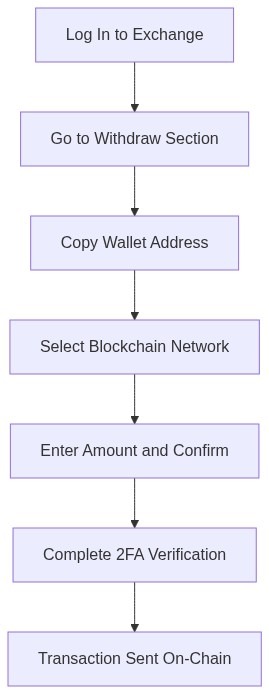
TL;DR: Log in to your exchange → go to the Withdraw section → select your asset → copy-paste your external wallet address → choose the matching blockchain network → confirm the amount → complete 2FA. Always run a small test transaction first, especially for large amounts. Most withdrawals complete in 10–60 minutes, though some exchanges quote up to 2–3 hours. Network fees range from fractions of a cent (Solana, $0.005) to several dollars (Ethereum mainnet, $1–$5).
What Does “Withdrawing Crypto” Actually Mean?
Withdrawing crypto is the act of moving your digital assets from an exchange’s internal ledger to a wallet address you control. The exchange holds your funds on its own system (essentially an IOU); a withdrawal takes those funds and puts them on-chain, where your private key is the only key that matters.
It’s worth noting that “withdrawal” means something slightly different depending on where you read it. Some platforms use the terms interchangeably with “send” or “transfer,” but the mechanics are the same: you’re initiating a blockchain transaction from the exchange to an external address.
Withdrawal vs. Transfer — What’s the Difference?
An internal transfer moves funds between accounts on the same platform (say, from your spot wallet to your futures wallet). It’s instant, free, and never touches the blockchain. A withdrawal does touch the blockchain, bringing network fees, confirmation times, and irreversibility with it. That distinction matters, especially around fees.
Before You Withdraw: What to Have Ready
Most exchanges won’t let you withdraw until you’ve completed a few prerequisites. Skipping these steps upfront is what leads to a frustrated 48-hour support ticket.
KYC verification. Pretty much every regulated exchange now requires identity verification before processing withdrawals. This generally means uploading a government-issued ID and sometimes a selfie. Annoying, yes, but it’s also what stops exchanges from being used as anonymous money-laundering channels, so it’s not going away. Complete it before you need it.
A destination wallet address. You need somewhere to send your funds. If you don’t have an external wallet yet, our reviews of the best crypto wallets break down the options by storage type and supported assets. Hardware wallets (Ledger, Trezor) give you the most security. Software wallets (MetaMask, Trust Wallet, Phantom) are more convenient for daily use.
2FA enabled on your exchange account. Most exchanges require two-factor authentication for withdrawals even if it’s optional for logins. If you haven’t set it up yet, do it now. Withdrawals are the highest-risk action in your account.
How to Withdraw Crypto to an External Wallet (Step by Step)
The exact interface varies by exchange, but the underlying steps are consistent across Binance, Kraken, Coinbase, KuCoin, and every major platform we’ve reviewed on Tradelize.
Step 1 — Go to the Withdrawal Section
Log in and go to your Wallet or Funds section. Look for a “Withdraw” button next to the asset you want to move. On most exchanges it’s either in a top-level menu or inside a specific asset’s page.
Step 2 — Enter Your Wallet Address
Open your external wallet and copy your receiving address. This is a long string of characters. On Ethereum it starts with “0x”, on Bitcoin it typically starts with “bc1” or “1” or “3”. Never type it manually. Copy it, paste it, then look at the first few characters and last few characters to verify the paste worked correctly.
Here’s a useful habit we’ve picked up: after pasting, read the first four characters and the last four out loud (or compare them visually to what’s in your wallet). Clipboard-hijacking malware exists: it silently replaces copied addresses with an attacker’s address. Not paranoid, just practical.
Step 3 — Choose the Correct Blockchain Network
This is where most mistakes happen. Your asset may be available on multiple networks (Ethereum mainnet, BNB Chain, Polygon, Arbitrum, Base), and each one has its own address format, fees, and speed. The network you select on the exchange must match the network your destination wallet is configured for.
If you’re sending USDT to MetaMask and you select BNB Chain but MetaMask is set to Ethereum mainnet, your funds will land in limbo (technically on-chain, but invisible in your wallet until you manually add the network). Sending to the outright wrong address format on a genuinely incompatible network is worse. That’s unrecoverable.
Step 4 — Enter the Amount and Confirm
Enter how much you want to withdraw. The exchange will show you the network fee deducted from the total. Review the final amount, complete any 2FA or email confirmation prompted, and submit.
After confirmation, your transaction is submitted to the blockchain. From here, it’s a waiting game. Miners and validators are processing it.
How Do You Choose the Right Blockchain Network?
Match the network on the exchange to the network your destination wallet is operating on. If you’re sending to MetaMask with only the Ethereum network added, you need to select Ethereum (ERC-20) on the exchange. If you’re sending to Phantom (a Solana wallet), you need Solana. If you’re sending to a Ledger that you’ve set up for BNB Chain, select BNB Chain.
A few practical shortcuts:
- Moving large amounts? Use the native network, even if it’s more expensive. Ethereum mainnet’s fees are higher, but the infrastructure is the most battle-tested.
- Moving stablecoins for everyday use? Layer 2 networks like Base, Polygon, or Arbitrum work well and charge a fraction of the fees (typically under $0.01 versus $1–$5 on Ethereum mainnet).
- Moving SOL or SPL tokens? Solana only. No ambiguity there.
- Don’t know which network your wallet supports? Check the wallet’s “Receive” screen. It will show which network(s) it’s on for that asset.
What Happens If You Pick the Wrong Network?
In some cases (ERC-20 to ERC-20 compatible chains, for example), the funds arrive on a chain your wallet doesn’t show by default, but you can recover them by adding that network manually. In other cases, particularly non-compatible chains or genuine address format mismatches, the funds are unrecoverable. Not retrievable. Not “pending somewhere.” Permanently gone.
“Irreversibility is one of the fundamental properties of public blockchain transactions,” notes the U.S. Commodity Futures Trading Commission (CFTC) in its consumer guidance on digital assets, and they’re not exaggerating for effect. There is no blockchain customer service.
How Long Does a Crypto Withdrawal Take?
Most standard withdrawals complete in 10–60 minutes. That said, “standard” covers a lot of ground. Here’s a more honest breakdown:
The exchange processing time is typically a few minutes: the exchange queues your withdrawal, runs internal security checks (especially for large amounts), and submits it to the blockchain. Some exchanges batch withdrawals periodically rather than broadcasting immediately, which can add 10–20 minutes.
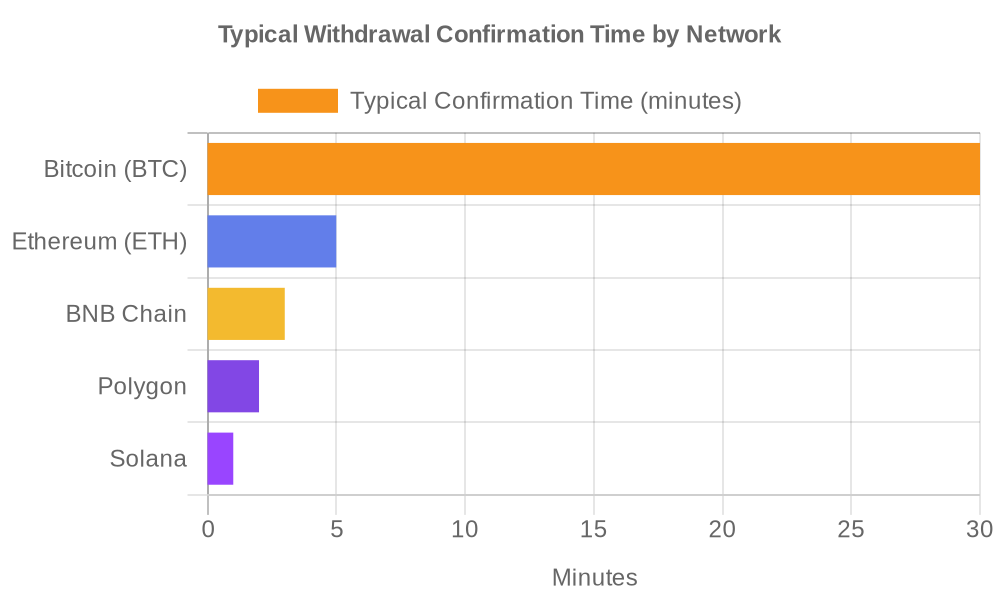
Blockchain confirmation time depends on the network. Bitcoin requires 6 confirmations for most exchanges to credit a deposit — at roughly 10 minutes per block, that’s up to an hour. Ethereum mainnet tends to confirm in minutes. Solana is typically seconds to 30 seconds. Layer 2 networks (Polygon, Arbitrum, Base) vary but are generally fast.
Network congestion matters. During periods of high activity (a major NFT mint, a market panic sell-off, a big news event), mempool backlogs pile up and slow everything down. Your BTC transaction that normally takes 30 minutes might sit for two hours or more if the fee was set too low.
What Do Crypto Withdrawal Fees Actually Cost?
There are two fee layers to know about.
Exchange withdrawal fee. This is charged by the exchange for processing the withdrawal. It’s usually a fixed amount per asset — a flat fee regardless of what you’re moving. Some exchanges (notably Kraken) charge very low fees; others layer in margin. You’ll see this displayed before you confirm.
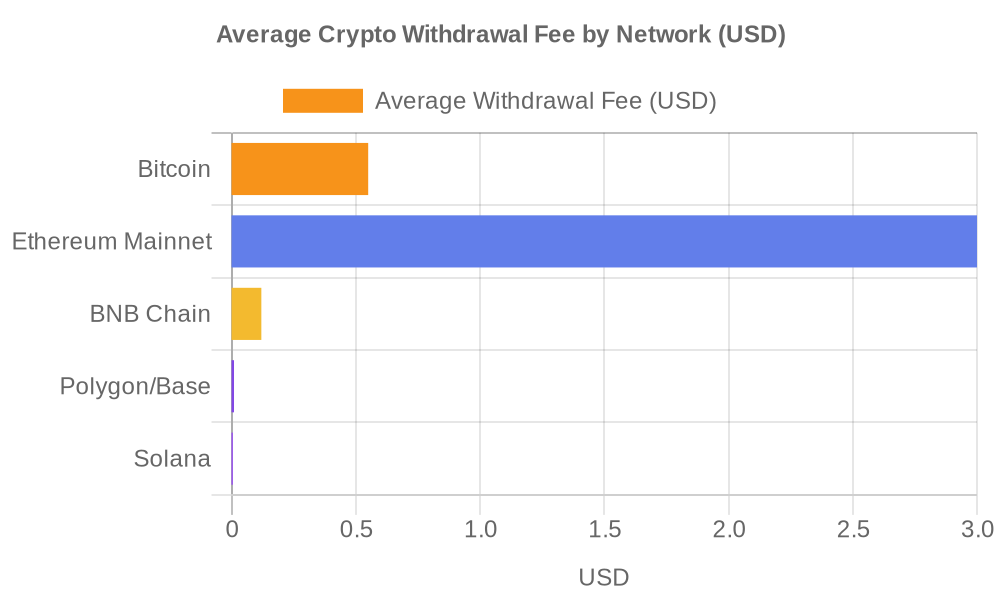
Network (blockchain) fee. This goes to miners or validators. It’s not revenue for the exchange. The actual cost depends heavily on the blockchain you’re using:
| Network | Typical Fee |
|---|---|
| Bitcoin (BTC) | $0.30–$0.80 |
| Ethereum mainnet | $1–$5 |
| BNB Chain | $0.05–$0.20 |
| Polygon / Base | ~$0.01 |
| Solana | ~$0.005 |
(Fee ranges based on Baltex Exchange 2026 data and community-aggregated observations from withdrawalfees.com. Fees fluctuate with network congestion.)
If you’re moving a small amount of crypto, fees matter a lot proportionally. Moving $50 in ETH on mainnet while paying a $3–$5 fee is a 6–10% cut off the top. Moving $5,000 in USDC on Polygon costs you a penny. Plan your network choice accordingly.
Common Mistakes That Cost People Their Crypto
Crypto losses hit $4.04 billion in 2025 (a 34.2% increase over 2024, according to CoinLedger’s annual crime report). Most of that wasn’t sophisticated hacking. A notable share was user error and social engineering: wrong addresses, wrong networks, falling for phishing sites that looked like exchange login pages.
The February 2025 Bybit hack ($1.5 billion — the largest single crypto theft in history) was an exchange-side breach, and users couldn’t have prevented it. But a large proportion of “lost crypto” cases we see written up in forums and Reddit threads? Those were preventable.
Here’s what to avoid:
Sending to the wrong address. The most obvious mistake. Copy-paste always. Never hand-type. After pasting, verify the first and last four characters match.
Selecting the wrong network. Already covered above, but worth repeating: this is the most common way people lose funds permanently. Verify twice.
Skipping the test transaction. Before moving $10,000 in crypto anywhere new, send $5–$10 first. Confirm it arrives. Then move the rest. It costs a dollar in fees; it buys real-time verification that your setup works.
Withdrawing to a wallet that doesn’t support the token. Not every wallet supports every asset. Check before you withdraw. MetaMask doesn’t natively show all ERC-20 tokens. You may need to manually add a token contract. Hardware wallets need the correct app installed.
Using a phishing site. Your exchange URL should be bookmarked, not found via search. Attackers buy search ads for terms like “Binance login” that lead to visually identical fake sites. One login attempt hands them your credentials. Use bookmarks, check the padlock, verify the domain down to the last character.
What Should You Do After Your Crypto Withdrawal Arrives?
Your wallet shows the balance. Good. A few more things to do before calling it done:
Verify the amount. Compare what arrived against what you sent, accounting for network fees. If the amount looks wrong, check a blockchain explorer (etherscan.io for Ethereum, blockchain.com for Bitcoin) by pasting your wallet address or the transaction hash.
Check the transaction status. “Confirmed” on a block explorer means miners have validated it and it’s final. “Pending” means it’s in the mempool waiting. If it’s been pending for more than 2–3 hours on Bitcoin, the fee may have been too low. Some exchanges allow you to contact support to accelerate or cancel pending transactions.
Revoke unnecessary token approvals. If you’re interacting with DeFi protocols via MetaMask or similar wallets, it’s good practice to check and revoke token spending approvals after major transactions (revoke.cash is a commonly used tool for this). Leaving unlimited approvals active on old contracts is a known exploit vector.
A quick note if you received funds on Tradelize’s reviewed exchanges: different platforms have different minimum withdrawal amounts and holding periods for newly deposited funds. Check the specific exchange’s help documentation if anything looks off.
The Bottom Line on Crypto Withdrawals
Withdrawing crypto from an exchange to an external wallet is a five-minute process when you know what you’re doing — and a potentially irreversible error when you don’t. The core rules are: copy-paste addresses (never type them), match the network on both ends, run a test transaction for anything above a few hundred dollars, and complete KYC before you need it urgently.
For practical next steps: browse our best crypto wallets guide to find the right destination for your assets, and check out our crypto exchange reviews if you’re deciding where to keep funds on-platform.
Frequently Asked Questions
Do I need to complete KYC to withdraw crypto?
Yes, on most regulated exchanges. KYC (identity verification) is required before withdrawals are enabled on platforms like Binance, Coinbase, Kraken, and KuCoin. Some DEX platforms (decentralized exchanges) don’t require KYC, but they operate differently and don’t hold your funds on their side to begin with.
What happens if I send crypto to the wrong wallet address?
It’s gone. Blockchain transactions are irreversible by design. No exchange or company can reverse a confirmed on-chain transaction. If the address belongs to someone who’s willing to cooperate, you might get it back, but don’t count on it. This is why test transactions exist.
Why is my crypto withdrawal taking longer than expected?
Most likely: blockchain congestion or exchange security review. Bitcoin withdrawals can take 30–60+ minutes under normal conditions; during high-traffic events, longer. Large withdrawals sometimes trigger manual review on the exchange side, adding hours. If it’s been over 24 hours with no change, contact exchange support with your transaction hash.
Is it safe to withdraw crypto to a software wallet?
Yes, as long as your seed phrase is stored securely offline and your device is clean. Software wallets (MetaMask, Trust Wallet) are more exposed than hardware wallets (Ledger, Trezor) because they’re connected to the internet. For anything above a few hundred dollars in crypto, hardware wallets are worth the investment.
What’s the cheapest network to use for withdrawing crypto?
For stablecoins and many ERC-20 tokens, Layer 2 networks like Polygon, Base, or Arbitrum typically cost under $0.01 per transaction. Solana is similarly cheap ($0.005). Ethereum mainnet and Bitcoin are the most expensive options — worth it for high-value or time-sensitive transfers, less so for moving $50.

Our Review Methodology
We evaluate each post based on thorough research, credibility of sources, accuracy of information, and relevance to our readers. Our editorial team follows strict guidelines to ensure all content meets high standards of quality.
Disclaimer
The content in this article is provided for informational purposes only and does not constitute financial, investment, or professional advice. Always do your own research before making any decisions.