In 2025, hackers stole $3.4 billion worth of cryptocurrency and the overwhelming majority of those funds came from hot wallets and exchange custodians connected to the internet. (Chainalysis, 2026) Cold wallet crypto storage exists to solve exactly that problem. If you hold any meaningful amount of digital assets, understanding how cold storage works — and whether it’s right for you — is not optional.
This guide covers everything: what cold wallets are, how they protect your funds, the different types available, and how to set one up without making the mistakes that cost people their crypto every year.
A cold wallet stores your private keys completely offline, making remote hacking essentially impossible. Hardware wallets — dedicated physical devices starting at $49 — are the most practical option for most users. The hardware wallet market hit $560 million in 2025, growing at 29% annually, as more investors shift toward self-custody. (SQ Magazine, 2026) If you hold crypto long-term, this is the safest storage option available.
What Is a Cold Wallet in Crypto?
A cold wallet — also called cold storage — stores your cryptocurrency private keys on a device or medium that has never been connected to the internet. Because the keys remain offline, remote hackers have no path to reach them. The hardware wallet market reached $560 million in 2025, growing at roughly 29% annually, as retail and institutional investors alike shift toward self-custody solutions. (SQ Magazine, 2026)
The name makes the concept clear: “cold” simply means offline. No internet. No exposure.
Here’s the part that trips most beginners: your actual cryptocurrency doesn’t live inside the wallet. It lives on the blockchain — a public ledger that records every transaction. What the wallet stores is the private key: a cryptographic password that proves ownership of those blockchain-recorded funds. Whoever holds the private key controls the crypto. Lose it, and the funds are unreachable forever. That’s why where you store it matters so much.
Cold wallets are the opposite of hot wallets — apps, browser extensions, or exchange accounts that stay connected to the internet. Hot wallets are convenient for trading. Cold wallets are built for one thing: keeping your keys out of reach.
How Does a Cold Wallet Work?
A cold wallet secures your funds by keeping the private key isolated from any internet-connected device at all times. When you need to send crypto, the transaction is signed offline — inside the cold wallet — and only the signed transaction is then broadcast to the blockchain from a separate, connected device. The private key itself never goes near a network.
The sequence looks like this:
- You initiate a transaction from your computer or phone
- The software creates an unsigned transaction and passes it to the cold wallet (via USB, Bluetooth, or QR code scan)
- The cold wallet signs it using your private key — without that key ever leaving the device
- The signed transaction is returned to your computer
- Your computer broadcasts it to the blockchain
That’s the entire security model. The key is generated offline, lives offline, and signs offline. An attacker who compromises your computer sees only a signed transaction — useless without the key that created it.

Cold Storage vs Hot Storage: What’s the Real Difference?
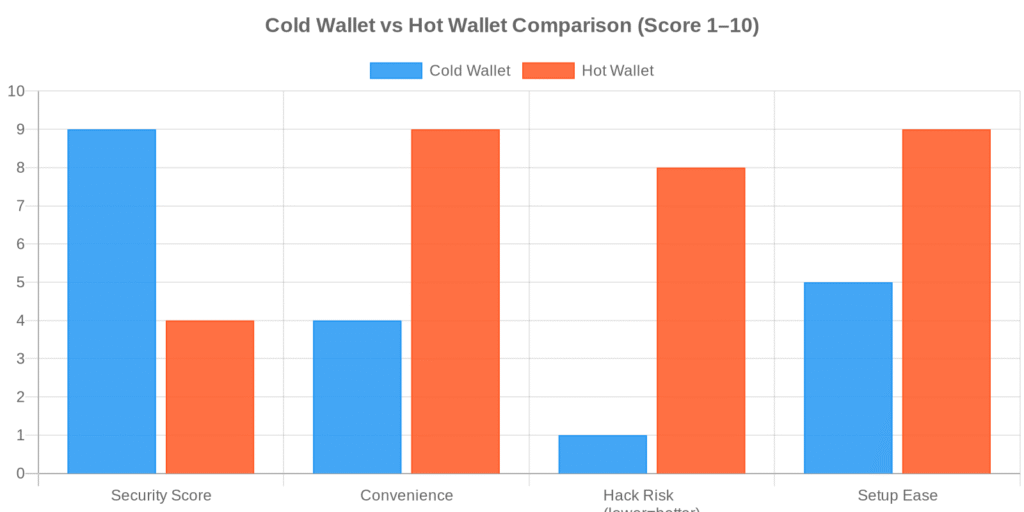
Hot storage keeps private keys on internet-connected devices — exchange accounts, browser wallets, mobile apps. Cold storage keeps them offline. According to Chainalysis data, approximately 78% of cryptocurrency thefts in 2025 targeted hot wallets or exchange custodians. No cold wallet has ever been remotely hacked at scale. (Chainalysis, 2026)
The Security Tradeoff
The gap isn’t subtle. A hot wallet is accessible from any device, anywhere, instantly. That convenience is also what makes it vulnerable — if your device gets malware, if your exchange gets hacked, if you click the wrong phishing link, the key is reachable.
A cold wallet requires a physical device in your hands to authorize a transaction. That extra friction is the point.
| Feature | Cold Wallet | Hot Wallet |
|---|---|---|
| Internet connection | None | Always connected |
| Private key storage | Offline (device/paper) | Online (app/exchange) |
| Remote hack risk | Extremely low | High |
| Transaction speed | Requires physical device | Instant |
| Cost | $0 (paper) to $399 (hardware) | Free |
| Best for | Long-term holding | Active trading |
| Recovery | Seed phrase (12–24 words) | Seed phrase or email/password |
The practical split most serious crypto holders use: keep a small operational amount in hot storage for trading and day-to-day activity, and the bulk in cold storage. Think of it like a checking account versus a home safe. You don’t carry your life savings in your wallet.
What Types of Cold Wallets Are Available?
Not all cold storage works the same way. Three main formats exist, and they differ meaningfully in cost, durability, and the technical demands they place on you.
Hardware Wallets
Hardware wallets are physical devices — USB sticks or smartcard-sized gadgets — that generate and store private keys inside a dedicated secure chip. Ledger, Trezor, and Tangem are the most widely used brands. Prices run from $49 for entry-level models (SafePal S1, Trezor One) to $249–$399 for premium devices (Ledger Flex, Ledger Stax).
The secure chip is what makes them hard to crack. It’s isolated from the device’s main processor, meaning even if someone plugs your hardware wallet into a compromised computer, the private key cannot be extracted remotely. Every transaction requires physical confirmation on the device itself — a button press, a PIN entry, or a screen tap.
I keep mine plugged into a dedicated old laptop I don’t use for anything else — no email, no web browsing, just crypto operations. Is that overkill? Possibly. But Reddit’s cold wallet threads are full of people who connected their Ledger to an infected work machine and watched their balance drain. The hardware alone isn’t enough if the computer it talks to is compromised.
Paper Wallets
A paper wallet is exactly what it sounds like: your public and private keys printed on paper (often as QR codes). You generate them completely offline, write or print them out, and store them physically somewhere safe. Zero cost. Zero electronics.
The concept is sound. The execution is where most people get burned. Paper burns. Paper floods. Paper fades. One house fire and those keys are gone. A laminated copy stored in a fireproof safe improves on that, but paper is still the least durable long-term option.
Paper wallets made more sense before hardware wallets became affordable. At $49, a hardware wallet is hard to argue against for anyone who cares about reliability.
Air-Gapped Devices
An air-gapped device is a computer or smartphone that has never been — and will never be — connected to the internet. Some security-focused users repurpose an old phone or laptop for this purpose. Transactions transfer via QR code scanning rather than any network connection, maintaining complete isolation.
This is the most technically demanding option. Any setup mistake — an accidental network connection, a contaminated USB drive — can compromise the isolation. Realistically, air-gapped setups are for technically confident users who want maximum control and are willing to maintain that discipline long-term.
Hardware Wallet vs Software Wallet: Which Is Safer?
Software wallets (MetaMask, Trust Wallet, Phantom) are apps running on internet-connected devices. Hardware wallets are physical devices storing keys offline. The security difference is significant. In 2025, 63% of individual cryptocurrency losses involved compromised software wallet credentials — phishing attacks, malware, or exchange breaches. (CoinLaw, 2025)
Software wallets are exposed to:
- Phishing attacks — fake websites and emails that capture your seed phrase
- Device malware — keyloggers and clipboard hijackers that steal credentials
- Browser extension exploits — compromised extensions with wallet access
- Exchange platform hacks — custodial wallets where the platform holds your keys
Hardware wallets are not immune to everything. Physical theft, a stolen or exposed seed phrase, or a tampered device from unofficial sources can still result in lost funds. But the remote attack surface is dramatically smaller. A hacker who can’t reach your private key — because it’s not on any network — simply cannot steal your crypto remotely.
For anyone holding more than they can afford to lose: hardware wins. Software wallets are appropriate for small, actively-used amounts — the equivalent of cash you’d carry in your pocket rather than a vault.
How to Set Up a Cold Wallet Step by Step
Setting up a hardware wallet takes 15–30 minutes. The process is similar across Ledger, Trezor, and Tangem — here’s the sequence:
Step 1 — Buy direct from the manufacturer. Never buy a used hardware wallet from third-party resellers or marketplaces like eBay. The device could be tampered with before it reaches you. Ledger, Trezor, and Tangem all sell direct through their official websites.
Step 2 — Initialize the device. Power it on for the first time. It will prompt you to create a new wallet or restore from a seed phrase. Choose “create new” if this is your first time.
Step 3 — Write down your seed phrase. The device generates a 12–24 word recovery phrase. Write it on paper. Never photograph it, type it anywhere digitally, or store it in a cloud service. This phrase is the master key to your funds — if someone else gets it, they own your crypto.
Step 4 — Verify the seed phrase. The device asks you to re-enter specific words from the phrase in a specified order. This confirms you wrote it correctly. Do not skip this.
Step 5 — Set your PIN. Choose a PIN you’ll remember. Three consecutive wrong PIN attempts on most devices trigger a full wipe. That’s a security feature, not a bug — it protects against brute-force attacks.
Step 6 — Install the companion app. Ledger Live, Trezor Suite — these apps manage your portfolio and initiate transactions. They communicate with the hardware device but never handle your private key directly. That stays in the hardware.
Step 7 — Transfer a small test amount first. Send a minimal amount (a few dollars worth) to your new wallet address. Verify it arrives. Then move larger holdings once you’ve confirmed the setup works end-to-end.
The single most important step isn’t on this list: store your seed phrase separately from your device, in a physically secure location. Keeping them together defeats the entire security model.
Is Cold Storage Really the Safest Way to Hold Crypto?
For remote threats: yes, by a significant margin. Cold storage reduces the risk of remote theft by over 95% compared to keeping funds in a hot wallet or on an exchange. (CoinLaw, 2025) The $1.5 billion Bybit hack in February 2025 — the largest single crypto breach ever recorded — targeted a hot wallet infrastructure. Every fund stored in cold storage was untouched. (Chainalysis, 2026)
That said, “safest” is not the same as “risk-free.” Cold wallets don’t protect against:
- Physical theft — if someone steals your device and your seed phrase is stored nearby
- Wrench attacks — physical coercion, which surged 75% in 2025 as crypto valuations rose (CoinLaw, 2025)
- User error — losing or destroying the seed phrase, entering it on a phishing site
- Supply chain attacks — tampered devices purchased from unofficial grey-market sellers
- Inheritance risk — no plan for what happens to the funds if you’re incapacitated
Most cold wallet losses are not from sophisticated hacking. They’re from people who:
- Stored the seed phrase on their phone (defeating the point of cold storage)
- Lost the seed phrase during a house move or renovation
- Threw out an old device without first recovering funds
- Kept the device and seed phrase in the same location
The hardware handles one problem — remote access — extremely well. Physical security and procedural discipline are your responsibility.

The Bottom Line on Cold Wallets
Cold wallet crypto storage is the most effective protection available against remote theft for individual crypto holders. A hardware wallet starting at $49 is straightforward to set up and eliminates the exposure that costs exchange and hot wallet users billions every year. The device keeps remote attackers out — but your seed phrase backup procedures, physical storage choices, and buying source keep you protected against everything else. If you’re holding any significant crypto for the long term, cold storage isn’t a nice-to-have. It’s the floor.
Ready to start? Explore our crypto wallet comparison guide or get started on Tradelize to begin your crypto journey.
Frequently Asked Questions
Can you lose crypto in a cold wallet?
Yes — but not through remote hacking. Cold wallets are not connected to the internet, so remote attacks aren’t the risk. The real threats are losing or destroying your seed phrase, purchasing a tampered device from an unofficial seller, or storing the seed phrase and device together where a physical thief could find both. Your crypto lives on the blockchain; the private key is the only way to access it. Protect the key.
How much does a cold wallet cost?
Hardware wallets range from $49 (SafePal S1, Trezor One) to $399 (Ledger Stax). The most popular mid-range options — Ledger Nano X ($149), Trezor Safe 5 ($169) — hit the right balance between features and cost. Paper wallets are free but lack durability. For most users, a $69–$149 hardware wallet is the practical sweet spot.
What happens if I lose my hardware wallet?
Nothing permanently, as long as your seed phrase is intact. Purchase a new device, enter your seed phrase during setup, and your entire wallet — every address, every balance — restores exactly as it was. The device is replaceable. The seed phrase is not. This is why protecting the phrase matters more than protecting the hardware.
Is a cold wallet worth it for small crypto amounts?
It depends on your threshold for loss. Under $500–$1,000, a well-secured software wallet may be proportionate to your holdings. Over $1,000–$2,000, a $49–$79 hardware wallet starts making obvious financial sense. The risk-reward calculation shifts quickly once balances grow.
What is the difference between a cold wallet and a hardware wallet?
All hardware wallets are cold wallets, but not all cold wallets are hardware wallets. Hardware wallet is the most common type — a dedicated physical device with a secure chip. Paper wallets and air-gapped devices are also forms of cold storage. The terms are often used interchangeably, but “cold wallet” is the broader category and “hardware wallet” is the most popular implementation.

Our Review Methodology
We evaluate each post based on thorough research, credibility of sources, accuracy of information, and relevance to our readers. Our editorial team follows strict guidelines to ensure all content meets high standards of quality.
Disclaimer
The content in this article is provided for informational purposes only and does not constitute financial, investment, or professional advice. Always do your own research before making any decisions.